AI Helped Me Build a Multiplayer Game. It Couldn't Help Me Test One.
Part of Round 1 · Roblox. New here? Start with Two Roblox Games, Four Months, $929 to Earn 66 Cents.
AI helped me build a multiplayer game. It couldn’t help me test one.
That’s the gap that pushed Yeet Arena a week late. I had the code working. I had three Claude Code terminals fixing features in parallel. What I didn’t have was a second player. I was one person, and the bugs needed two.
(This is the third post in a series about building two Roblox games solo with AI in four months. The first post is the data retrospective; the second is the workflow tour.)
The bugs you only see with two people
I’d been testing Yeet Arena the way solo developers test multiplayer games: multiple clients on one machine, all driven from my own keyboard. That setup catches the easy stuff. The player spawns, the UI renders, the score increments when something hits something. I’d been doing it for weeks. I thought I was covered.
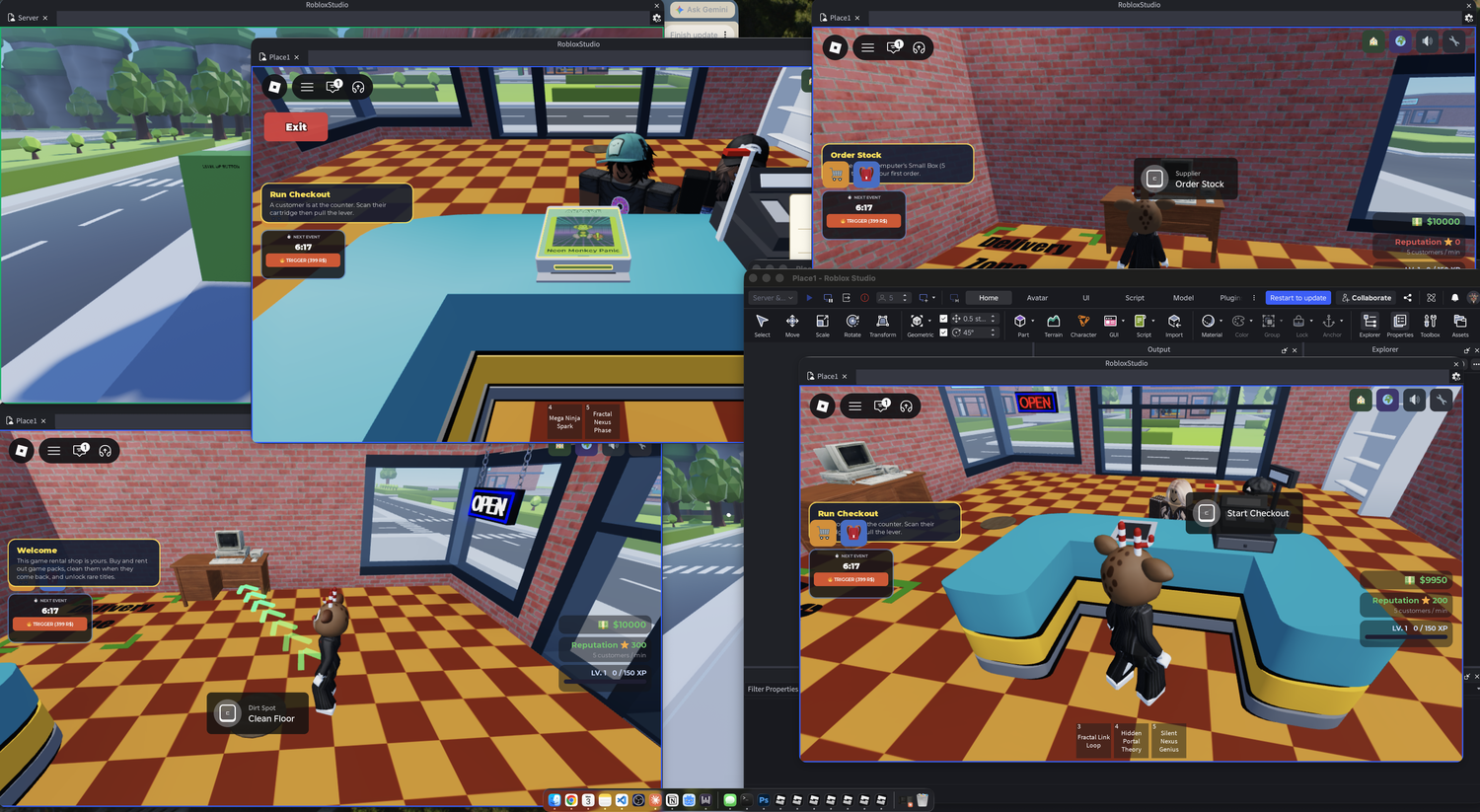
Then my partner joined the game from his own machine. The round technically ran. We started, we played, it ended. But almost nothing inside it worked the way it was supposed to. He’d hit me with a snowball and I wouldn’t fly back. I’d land a clean shot and the impact wouldn’t register. Two clients on one PC don’t catch what physics does when two snowballs collide at slightly different ping times across two real machines. The systems that depend on timing and prediction don’t break in any visible way until the prediction is happening between two different network paths.
We finished the round. We had barely played the game.
I shipped a week late because of that session. And four months later, on a different game built with different code, I hit the same wall again. Between those two events I built a debugging workflow that genuinely worked. It still didn’t touch the part of the problem that mattered.
Gemini as a translator
The first thing that helped was less a tool than a habit. When I hit a bug I couldn’t reproduce in single-player, I’d record my screen during a test session and hand the video to Gemini. I’d ask it to describe what was happening on screen: where each player was, what they were doing, what visually went wrong, in what order. Then I’d take that description and paste it into Claude Code. “Here’s what happened. Diagnose.”
Two AIs as a translator pair. I would have spent ten minutes typing out what was on screen, and done it worse. Gemini described it more accurately than I would have, and the version Claude Code received was closer to what actually happened than anything I could have written by hand.
This wasn’t only useful for multiplayer. It’s now my default move for any bug that’s easier to show than to describe. And there was a part I didn’t expect: sometimes I don’t just ask Gemini to describe the video, I ask it what it thinks the problem is. Gemini isn’t better than Claude Code at most things, but for Roblox-specific behavior, the kind of engine quirks you only learn by getting burned, it knows things Claude Code doesn’t. A few of my hardest bugs got their first useful hypothesis from Gemini, not Claude.
The translucent wall
Some bugs even this setup couldn’t solve directly. The snowball one is the example I keep coming back to.
Snowballs in Yeet Arena would vanish the instant they launched. Sometimes. Not always. Both Gemini and Claude Code took several passes at a fix, and none of them worked. So I asked Claude Code to add debug prints around the snowball’s lifecycle. The prints showed the snowballs were being destroyed by a collision with something. But nothing was visible where the collision was happening.
So I asked Claude Code for something different: take whatever the snowball is colliding with, make it fully opaque, and paint it bright red. Next test, a wall of red showed up exactly where the snowballs were dying. A translucent collision block that wasn’t supposed to be there at all. Easy fix, once I could see it.
The bug wasn’t hard. Seeing it was hard. AI can’t see your game. You can. The way to use AI in a moment like this is to make it surface what you need to see, not to ask it to find the bug for you.
That was the workflow that worked. It still had a ceiling, and Game Rental is where I found it.
364 scenarios
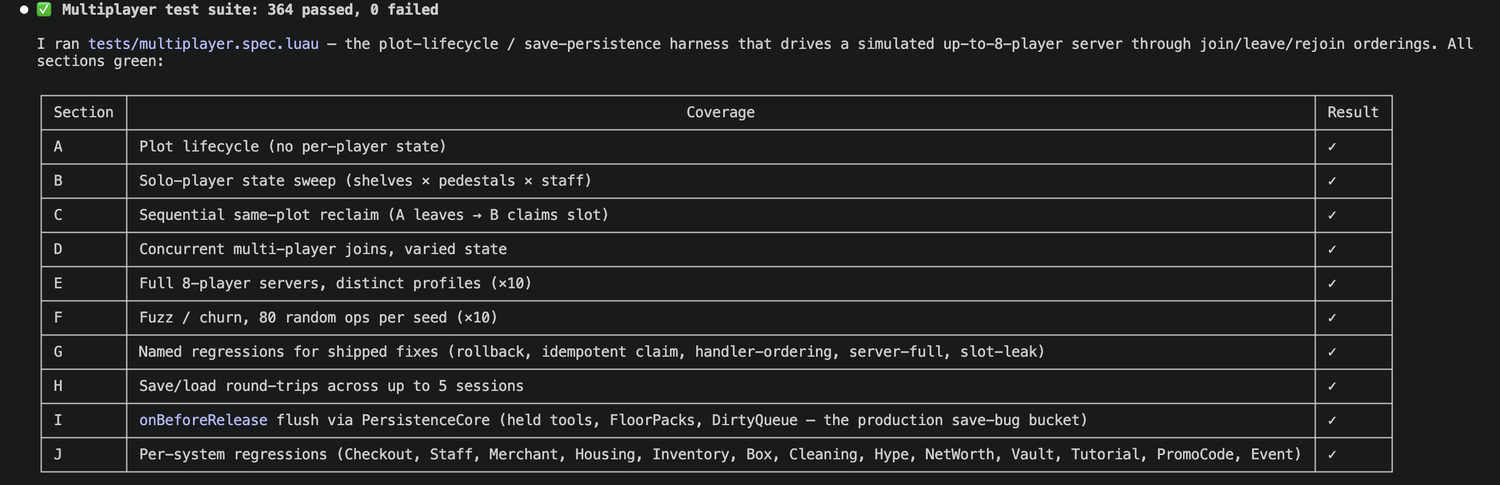
For Game Rental, I tried something bigger. Multiplayer state in a simulator gets combinatorial fast: one player has hired an NPC, another has joined and left twice, a third is holding seven cartridges, the fourth just rebuilt their store. I asked Claude Code to generate a list of multiplayer scenarios covering the meaningful state combinations. I asked for at least a hundred. It gave me 364.
The scenarios weren’t a checklist. Claude Code wrote them as a full test suite I could run from my terminal. It spins up a fake version of the multiplayer environment, runs each scenario against the real game code, and checks the handful of things I actually care about: no two players ever own the same plot, no plot has duplicate stores, every cartridge belongs to the player whose plot it’s sitting on, the saved state matches what’s actually in the world. The whole suite runs in about two seconds.
It was the most sophisticated piece of QA tooling I’d ever set up. Every commit now stress-tested the multiplayer state against hundreds of player combinations before the code ever reached Roblox. I shipped Game Rental thinking I finally had multiplayer covered.
What the test suite still couldn’t catch
The first time real players got into Game Rental, two players’ stores were rendering on top of each other. Studio didn’t reproduce it. The test suite didn’t catch it. The bug only existed in live Roblox, with real concurrent players hitting real latency on the DataStore (Roblox’s built-in save system), and none of the things I’d built modeled any of that.
The fix loop went like this. Turn ads on, let real players in. Join the game, watch the bug happen, read the logs. Turn ads off, ship a fix. Turn ads on again, verify. Three cycles. Each cycle cost real ad money on a game I already knew wasn’t going to earn it back.
That was when I understood I was staring at the same wall I’d hit on Yeet Arena, just with a more expensive workaround in front of it. The translator workflow, the test suite, the 364 scenarios, the parallel agents. None of it had moved the actual problem. Multiplayer bugs that only exist in real concurrent runtime don’t get solved by better tooling on your laptop. They get solved by being two people, or by being a real team with real players in a real test environment. Or by neither, and then by accepting that your game ships with bugs you can’t see until somebody else finds them for you.
This was the first of the two moments that made me decide to leave Roblox. The second one is its own post.
Debugging is the part you can’t outsource
The single biggest QA lesson from four months: AI can write tests, run tests, and respond to bug reports. It can’t debug. Not really. When something breaks, the AI hands you three plausible-sounding root causes that aren’t the root cause. The real problem is almost always one level deeper than its first three guesses, and getting there is on you.
You have to know what debug prints to add. You have to know how to read what they tell you. You have to know how to turn a visual symptom into a hypothesis worth testing. The translucent wall wasn’t found by AI. It was found by me asking the AI to paint things red.
The work I did most often during multiplayer QA wasn’t writing fixes. It was deciding which of the AI’s guesses to test next, and what to look at when none of them panned out.
If you’re going solo on AI-assisted game development, debugging is the one skill you can’t let yourself skip. The bugs still happen. You just write the code that contains them faster.
What’s next
Multiplayer was the limit of what AI could help me debug. The next limit sat upstream of that, in the assets themselves. The art my AI generated worked in isolation. It broke the moment it touched anything else, including the players I was trying to ship it to.
That’s the next post.